Turbo AI - Notetaker
- 4.7
- Rating
- 1.00M
- Installs
- Free
- Price

 Analysis by App-foxy
I tried Turbo AI - Notetaker as an education app for turning spoken or written learning material into something easier to review. My first impression was that it is aimed at the moment after a lecture, class, study session, or meeting, when you have plenty of information but no clean plan for revisiting it. Instead of leaving with scattered notes and good intentions, the app is designed to help you create notes, flashcards, and quizzes in one place.
That focus makes it more practical than a basic notes app, but it also means you should approach it as a study assistant rather than a complete replacement for careful note-taking. I found the most value when I used its generated material as a first draft, then checked the important details myself. If you want a quick way to turn learning content into review material, it is worth exploring. If you need perfectly edited academic notes without any checking, you may find the experience less satisfying.
What to expect from Turbo AI - Notetaker
The app comes from Turbo AI and sits in the education category. It is free to install, with optional in-app purchases ranging from $7.49 to $99.99 per item. That combination matters: you can try the basic experience before deciding whether the more advanced or extended use is worth paying for. The content rating is Everyone, so its general presentation is suitable for a broad audience, including students and people using it for work-related learning.
You May Also Like

 Blood Strike: 2.5 Anniversary
Blood Strike’s Loadouts Turn Every Drop Into a Tactical Gamble
A close look at Blood Strike’s custom loadouts: how fast access to signature weapons reshapes its battle royale rhythm, rewards preparation, and narrows the gap between fights.

 Pandora - Music & Podcasts
Pandora’s Music Is Easy to Start, but Harder to Recover
Pandora’s strength is its low-effort path from a seed to a station. Its weak spot is how much confidence it asks you to place in connection, setup, and quiet recovery.

 8 Ball Pool
 Is Built on Rivalries, Rematches, and Routine
A close look at the rivalries, rematches, shared routines, and unanswered safety questions that turn a quick pool match into a persistent mobile community.

 Samsung Music
’s Quiet Strength Is Playing What You Already Own
Its reach comes less from spectacle than from dependable access to a personal library. That simplicity is both the app’s strongest retention engine and its ceiling.

 AccuWeather: Weather Radar
AccuWeather Review: A Quick, Clear Forecast for Everyday Decisions
For everyday plans, the best forecast is the one you can understand quickly. AccuWeather makes rain timing, radar, and local conditions easy to act on, with a few trade-offs.

 Hill Climb Racing
Why Hill Climb Racing Still Turns Crashes Into One More Run
A tiny car, a bumpy hill and one more upgrade: Hill Climb Racing keeps resurfacing because its simple chaos makes every near-miss feel personal.
More From Our News Desk



Its central idea is straightforward. You bring learning material into the app, and Turbo AI helps shape it into organized notes and active-review tools. Notes are useful when you want a readable summary. Flashcards are better when you need to test recall. Quizzes add a little more structure by making you retrieve information instead of simply reading it again.
I like that these formats serve different stages of learning. Notes help me understand the outline of a topic. Flashcards expose the facts I have forgotten. Quizzes show whether I can recognize the right answer or connect ideas under a little pressure. The app is most convincing when I move through those stages instead of treating the generated notes as the finished product.
The public response is also encouraging, with a 4.7 average from around 318 thousand ratings and more than 1 million installs. Those figures suggest that the concept has found a sizable audience, although popularity should not replace your own test. The app is currently on version 1.5.3 and works on Android 8.0 or later, so older devices may need a quick compatibility check before installation.
Getting ready for the first useful session
For a first-time user, I would not begin by importing an entire semester of material. Start with one lecture, one meeting, or one compact reading session that you already understand reasonably well. This gives you a reference point: you can compare the generated notes with what you remember and quickly see whether the result is useful.
Before starting, decide what you want from the session. If your goal is a clean overview, concentrate on the notes. If you have an exam coming up, move quickly toward flashcards and quizzes. This small decision prevents a common mistake: collecting attractive summaries without actually practicing recall.
A good first workflow is to capture the material, read the resulting notes once, correct anything that looks unclear, and then use the flashcards immediately. I would resist the temptation to edit every sentence before testing yourself. The point of the first pass is to find the weak spots. Editing can come afterward, once you know which parts are genuinely confusing.
One useful habit is to keep your own questions beside the generated material. When a lecturer says something that seems important, write a short question rather than only copying a sentence. Later, compare those questions with the flashcards Turbo AI creates. This reveals whether the app picked up the ideas you personally considered important, not just the most obvious terms.
Another practical tip is to separate unrelated subjects rather than feeding everything into one large session. A focused set of material is easier to review and easier to judge. If history, biology, and mathematics are mixed together, the resulting study material may feel less coherent even when each individual part is reasonable.
The first successful action: turning one session into review material
The first moment when the app made sense to me was not simply seeing a summary. It was opening the generated material and using it to decide what to study next. That distinction is important. A summary can create the feeling that you understand something, while a flashcard or quiz asks you to prove it.
I recommend reading the notes for structure rather than memorization. Look for the main topic, supporting ideas, definitions, examples, and any sequence of steps. If a point seems too broad or oddly worded, treat that as a prompt to check the original material. Artificial intelligence can make information look tidy even when a nuance has been compressed.
Then use the flashcards without looking back at the notes first. Give yourself a moment to answer each one from memory. Cards that feel easy are not necessarily the most valuable; the useful ones are often those that make you pause. Mark those mentally or keep a short list of them, because they should receive another pass later.
Quizzes are especially helpful when you are preparing for a class test and need a change from passive reading. I found them more useful as a diagnostic than as a final measure of mastery. Getting an answer right may mean that the wording was familiar, while getting it wrong can reveal a missing connection. After each mistake, return to the relevant note and explain the idea in your own words.
This workflow also works outside formal education. After a professional presentation, I could use the notes to preserve the main decisions, flashcards to remember unfamiliar terminology, and quizzes to check whether I understood the process rather than merely attended the meeting. For a language learner, the same pattern can support vocabulary and concepts, although I would still want a dedicated language app for pronunciation and conversation practice.
Where the app saves time, and where it needs supervision
The biggest advantage is the reduction of friction between consuming information and reviewing it. Normally, I might finish a lecture, promise myself that I will rewrite the notes, and then never create the flashcards. Turbo AI gives that next step a more immediate shape. Even when the output needs editing, having a draft is often better than starting with a blank page.
It is also useful for people who struggle with organization. The three-format approach gives a natural progression: read the notes, practice with flashcards, and check yourself with quizzes. That structure can be more motivating than a long document full of highlighted sentences.
Still, generated content should not be accepted automatically. The app may simplify a complicated explanation, combine ideas that should remain separate, or emphasize a detail that is less important than the context around it. This is not a reason to avoid the tool; it is a reason to use it as an assistant. I would always compare high-stakes material with the original lecture, textbook, or course instructions.
There is also a difference between recognizing information and producing it independently. Flashcards can help with recall, but they do not automatically teach you how to write an essay, solve a new problem, or explain a difficult theory in your own words. For those tasks, I would add handwritten practice, worked examples, or a conversation with a teacher.
The purchase model is another point to consider. You can begin without paying, but optional items cost between $7.49 and $99.99 each. That wide range means the value depends heavily on how often you use the app and what the paid options provide for your particular workflow. I would use the free experience on a real study task before committing to any purchase, especially if you only need occasional summaries.
Common confusion during everyday use
The first confusion many users may have is expecting a polished final document immediately. I would think of the first output as an editable study draft. Read it actively, correct terminology, and check whether the order of ideas still matches the original material. This takes less time than writing everything from scratch, while preserving your responsibility for accuracy.
A second issue is using the app too late. If you wait until the night before an exam and generate a large amount of material at once, you may end up reviewing summaries instead of learning. Turbo AI works better as part of a repeated routine. After each class or study block, create a small review set, then return to older material before adding more.
Another easy mistake is confusing more flashcards with better preparation. A large deck can become a chore, particularly when several cards ask nearly the same question. I prefer to remove or ignore duplicates and keep cards that test distinct facts, relationships, or steps. The goal is not to produce the largest possible collection; it is to make each review session useful.
You may also wonder whether the app suits group work. It can help an individual turn shared learning material into personal review material, but I would not assume that its notes replace the group’s official record. For meetings, keep confirmed decisions and assigned responsibilities in the team’s normal system, then use Turbo AI for your own understanding and follow-up questions.
Privacy and sensitivity should influence what you choose to process. I would avoid placing confidential workplace content, private conversations, or restricted course material into any AI note-taking workflow unless you have checked that its use is appropriate. This is a sensible precaution for any app handling personal or professional information, not a criticism aimed only at this one.
Who will get the most from it
Turbo AI is a strong fit for students who already attend lectures or read regularly but struggle to turn that effort into revision. It is also appealing to independent learners who want a quick way to move from a long session to a set of questions. People who prefer active recall over rereading will probably notice the benefit fastest.
It can be particularly helpful for a busy person who has only a short window after learning. Imagine finishing an evening class, arriving home tired, and knowing that rewriting every note would take too long. Creating a compact review set immediately gives you something to revisit the next morning. The app does not remove the need to study, but it can make the first follow-up action much easier.
I would be more cautious if you are studying a subject where exact wording, detailed proofs, or subtle exceptions are central. In those cases, the generated material can be a starting map, but your textbook, instructor, and original examples should remain authoritative. I would also skip it if you want a simple blank notebook with no automated processing. A traditional notes app may feel calmer and give you more direct control.
Compared with ordinary note-taking apps, this one offers a more complete path from information to practice. Compared with dedicated flashcard apps, its advantage is convenience because the cards can begin with material you have already captured. Compared with quiz-focused study platforms, it is more flexible for turning personal lectures and meetings into review content, but it may not offer the same depth of subject-specific teaching.
A sensible next step after the first session
After your first successful session, I would create a simple routine rather than immediately exploring every option. Use one focused set after each lecture or study block, review the difficult cards the following day, and take a quiz later in the week. This spacing gives the material time to become a memory instead of remaining familiar only because you read it moments ago.
Keep a small correction habit. Whenever Turbo AI produces an incomplete or misleading card, rewrite it in a clearer form and ask yourself why the original was weak. Over time, these corrections teach you how to prepare better source material and how to judge automated study aids. That is one of the less obvious benefits: the app can improve your study judgment, not just your collection of notes.
I would also use the app to identify gaps before seeking help. If a quiz repeatedly exposes the same misunderstanding, bring that exact topic to a teacher, classmate, or reliable reference. A vague feeling of confusion is difficult to act on; a specific missed question gives you a concrete next step.
For me, the best way to judge the app is not by how attractive its first summary looks, but by whether it helps me remember something later. Turbo AI - Notetaker earns a recommendation when used with that standard. It is free to start, accessible to a wide audience, and built around a genuinely useful combination of notes, flashcards, and quizzes. The trade-off is that I still need to verify, edit, and think.
My recommendation is to try it with one real lecture or study session, then judge the quality of the review rather than the novelty of the automation. If that first set helps you find forgotten details and gives you a practical plan for the next study session, it may become a valuable part of your routine. If you need total manual control or highly specialized instruction, keep your usual tools close and treat this app as an optional helper rather than the center of your learning system.
FAQs for Turbo AI - Notetaker
01What is Turbo AI - Notetaker used for?
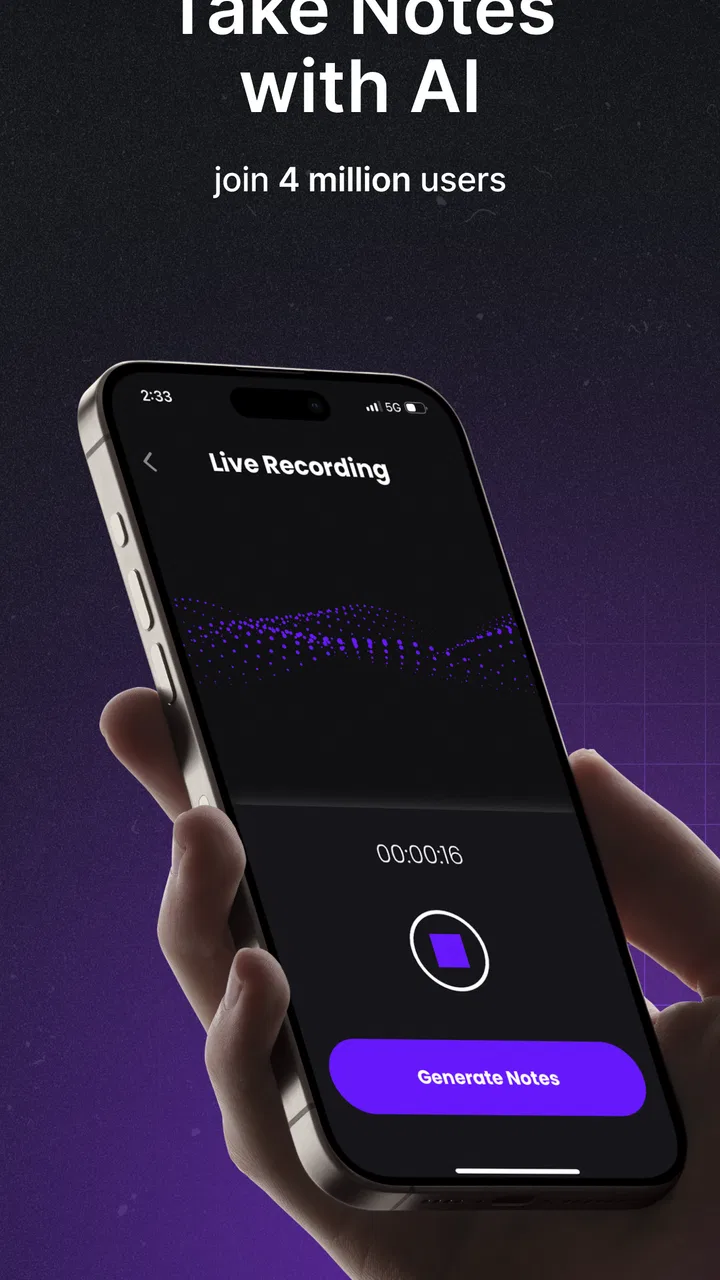
Turbo AI - Notetaker is designed to record, transcribe, summarize, and organize spoken content such as meetings, lectures, interviews, and personal voice notes. After testing its workflow, the main benefit is that it reduces the need to write everything manually while listening. It can help turn lengthy conversations into searchable notes, key points, and more manageable follow-up material.
02Can Turbo AI - Notetaker transcribe recordings accurately?
The app can produce useful transcriptions, but accuracy depends on audio quality, speaker clarity, background noise, accents, and the language being spoken. In a quiet room with a phone placed reasonably close to the speaker, results are generally easier to follow. However, important names, technical terms, numbers, and unclear sections should always be checked against the original recording before sharing or relying on the notes.
03Does Turbo AI - Notetaker work with live recordings and existing audio files?
Turbo AI - Notetaker is primarily intended for capturing and processing spoken content, and its available workflow may support both live recording and imported audio, depending on the device and current app version. Users should review the import options after installation because supported file formats, recording limits, and processing requirements can change. A stable internet connection may also be needed for AI processing.
04Is Turbo AI - Notetaker free to download and use?
The app may be available to download without an upfront charge, but some advanced features can require a subscription, credits, or an in-app purchase. Limits may apply to recording duration, transcription minutes, summaries, exports, storage, or access to premium AI tools. Before starting a long recording, check the current pricing page and trial terms so you understand what is included in the free version.
05Is it safe and appropriate to record meetings or classes with Turbo AI - Notetaker?
Using a transcription app involves sending or storing audio and text data, so privacy should be considered before recording sensitive conversations. Always obtain permission from other participants where required by law or workplace policy, and avoid capturing confidential information unless the service’s privacy terms meet your needs. Review account, cloud-storage, deletion, and data-processing settings before using the app regularly.
Pros
- Automatically transcribes meetings and conversations in real time.
- Creates concise summaries
- action items
- and key discussion points.
- Searchable transcripts make it easy to find specific information later.
- Supports multiple languages for diverse meetings and study sessions.
- Reduces the need for manual note-taking
- helping users stay focused.
Cons
- Transcription accuracy can drop with background noise or overlapping speakers.
- Some useful features may require a paid subscription or usage limits.
- Processing recordings can consume considerable battery and mobile data.
- Sensitive meeting content may raise privacy and data-storage concerns.
- Speaker identification is not always reliable in group conversations.

Turbo AI - Notetaker
Gallery